가상 클래스(Pseudo Class)
✒️ 2025-05-16 12:40 내용 수정
CSS에서 특정 상태나 조건에 있는 요소를 선택하기 위한 클래스
- 참고 자료 : TCPSchool CSS 가상 클래스
식별자:가상클래스{스타일규칙}으로 작성한다.- 주의사항 : hover와 active를 사용할 때 hover - active 순으로 작성해야 정상적으로 작동한다.
selector:가상클래스{
 /* 스타일 규칙*/
}
| 가상클래스 | 설명 | |
|---|---|---|
| 동적 의사 클래스 | :link |
링크의 기본 상태, 사용자가 한 번도 링크를 방문하지 않음. |
:visited |
사용자가 한 번이라도 링크를 방문함. | |
:hover |
마우스가 요소 위에 올라가 있는 상태 | |
:active |
요소가 활성화된 상태(클릭중) | |
:focus |
요소가 포커스를 받은 상태 | |
| 상태 의사 클래스 | :checked |
input 요소 중에 체크된 상태의 요소를 선택 |
:enabled |
input 요소 중에 사용할 수 있는 요소를 선택 | |
:disabled |
input 요소 중에 사용할 수 없는 요소를 선택 | |
| 구조 의사 클래스 | :first-child |
부모 요소의 첫 번째 자식 요소, 해당 요소들 중 첫 번째 |
:last-child |
부모 요소의 마지막 자식 요소, 해당 요소들 중 마지막 | |
:nth-child(n) |
부모 요소의 n번째 자식 요소 | |
| n은 odd, even, 4n, 숫자 등을 쓸 수 있음 | ||
:nth-last-child |
모든 자식 요소 중에서 뒤에서 부터 n번째 자식 요소를 선택 | |
:first-of-type |
모든 자식 요소 중 특정 타입에서 맨 처음으로 등장하는 요소 선택 | |
:last-of-type |
모든 자식 요소 중 특정 타입에서 맨 마지막으로 등장하는 요소 선택 | |
:nth-of-type |
모든 자식 요소 중 특정 타입에서 n번째로 등장하는 요소 선택 | |
:nth-last-of-type |
모든 자식 요소 중 특정 타입에서 뒤에서 부터 n번째로 등장하는 요소 선택 | |
:only-child |
자식 요소를 단 하나만 가지는 요소의 자식 요소를 선택 | |
:only-of-type |
자식 요소로 특정 타입 요소 하나만을 가지는 요소의 자식 요소를 모두 선택 | |
:empty |
자식 요소를 가지고 있지 않은 요소를 선택 | |
:root |
해당 문서의 root 요소 선택 |
<!DOCTYPE html>
<html>
	<head>
		<meta charset="UTF-8">
		<title>Insert title here</title>
		<style>
			*{margin:0; padding:0;}

			li{list-style:none;}
			ul{width:130px;
			   margin-left:20px;}

			#box1 a{background: blue;
			  text-decoration: none;
			  color:white;
			  display:block;
			  margin:3px;
			  padding:5px;
			  font-weight: bold;}

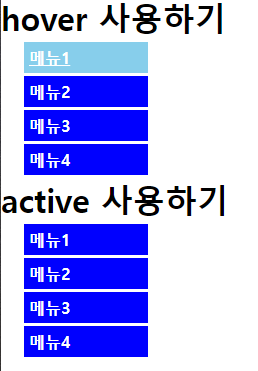
			#box1 a:hover{
			  background: skyblue;
			  text-decoration: underline;
			}

			#box2 a{background: blue;
			  text-decoration: none;
			  color:white;
			  display:block;
			  margin:3px;
			  padding:5px;
			  font-weight: bold;}

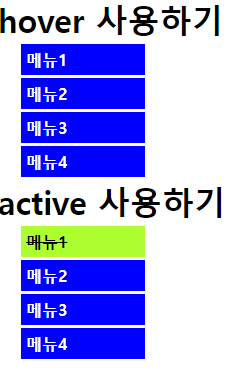
			#box2 a:active{
			  background: greenyellow;
			  color:black;
			  text-decoration: line-through;
			}
		</style>
	</head>
	<body>
		<div id="box1">
			<h1>hover 사용하기</h1>
			<ul>
				<li><a href="#">메뉴1</a></li>
				<li><a href="#">메뉴2</a></li>
				<li><a href="#">메뉴3</a></li>
				<li><a href="#">메뉴4</a></li>
			</ul>
		</div>

		<div id="box2">
			<h1>active 사용하기</h1>
			<ul>
				<li><a href="#">메뉴1</a></li>
				<li><a href="#">메뉴2</a></li>
				<li><a href="#">메뉴3</a></li>
				<li><a href="#">메뉴4</a></li>
			</ul>
		</div>
	</body>
</html>
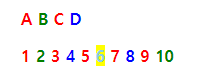
<!DOCTYPE html>
<html>
	<head>
		<meta charset="UTF-8">
		<title>Insert title here</title>
		<style>
			li{list-style:none;
				display:inline;
				font-weight: bold;}
			li:first-child{color:red;}
			li:last-child{color:blue;}

			li:nth-child(odd){color:red;}
			li:nth-child(even){color:green;}
			li:nth-child(4n){color:blue;}
			li:nth-child(6){color:skyblue; background: yellow;}
		</style>

	</head>
	<body>
		<ul>
			<li>A</li>
			<li>B</li>
			<li>C</li>
			<li>D</li>
		</ul>

		<ul>
			<li>1</li>
			<li>2</li>
			<li>3</li>
			<li>4</li>
			<li>5</li>
			<li>6</li>
			<li>7</li>
			<li>8</li>
			<li>9</li>
			<li>10</li>
		</ul>
	</body>
</html>